
A mod is a Godot resource pack exported from a copy of the game project with your changes added, most often a decompiled copy. A pack can change the game in two ways, and one mod can use both:
- A startup script in the pack's own folder, which the game runs as a node.
- Files at the same path as the game's own, which replace them.
Mods built on the community framework QualiaMods start differently and have their own editor tools; see QualiaMods.
Get the project
The game's developer suggests GDRE Tools, a free Godot decompiler. The game's pack is built into lucid-blocks.exe: recover the project from that file into an empty folder, then open the folder in the Godot editor. Recover it again after each game update, so the game files you build on match the version players have.
Engine version
The game runs on Godot 4.6, built with double precision. Open the project and export with 4.6:
- The site refuses packs built by a newer Godot.
- Scripts exported by Godot 4.3 or 4.4 use a compiled format that 4.6 refuses to load. The upload check warns about them.
- The game's native library comes only in double precision, so use a double-precision build of the 4.6 editor. The official downloads are single precision. The game's developer shared a double-precision build on Google Drive, or you can build one from source with
precision=double.
Run code at startup
Once the packs are loaded, the loader looks in res://mods/. For each folder there that holds a mod_init.gd, it creates the script as a node and adds it under the game's ModLoader node. Keep your mod's files in a folder of its own:
res://mods/better_hotbar/mod_init.gd
res://mods/better_hotbar/hotbar_patch.gd
mod_init.gd has to extend Node or a class based on it:
extends Node

func _ready() -> void:
	# The game's own nodes finish starting after this one, so wait a frame.
	await get_tree().process_frame
	print("better_hotbar is running")
The folder name becomes the node's name, so this one runs at /root/ModLoader/better_hotbar. The loader drops everything after the last dot in the name, which turns better.hotbar into better. Stick to lowercase letters, digits and underscores.
The loader runs every mod_init.gd in res://mods/, from every pack. A mod_init.gd anywhere else in a pack never runs. Two mods that pick the same folder name overwrite each other's files, so choose a name that is clearly yours. Files inside your own folder can't collide with the game's.
Replace a game file
A file in your pack at the same path as one of the game's replaces it while the pack is loaded. This is how a mod changes a texture, a sound, a scene or one of the game's scripts. The site calls these files outside the mod folder. Before you replace one:
- Your copy replaces the whole file. To change one function in a game script, start from the game's script and change only that function.
- Another mod that replaces the same file wins or loses by load order.
- A game update can change the file you replaced. Your old copy then hides the new one until you export again from the new game version.
- The game's scripts are compiled, and a
.remapfile next to each one points the game to the compiled copy. A plain.gdat a game script's path is ignored while that.remapstill points elsewhere. Export it with the editor, which writes the compiled script and a.remapthat points to it. - Textures and sounds need the editor's export too, so the pack carries the imported copies the game reads.
Replace as few files as you can. A startup node that finds game objects and changes them while the game runs replaces nothing, so it can't collide with another mod.
Export the pack
A pack should hold your own files and the game files you changed, nothing else. The game's developer exports mods this way:
- From the Project menu, choose Export, then Add… and Windows Desktop.
- On the Resources tab, set the export mode to Export all resources in the project except resources checked below.
- Tick the project's root folder. Every file is now left out.
- Untick your mod's folder and each game file you changed.
- Export PCK/ZIP at the bottom of the dialog writes the pack. Save it as a
.pckfile.
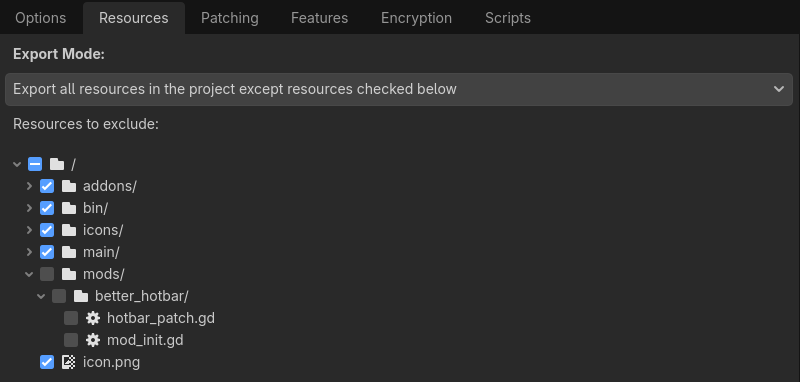
The preset keeps the list of ticked files. A file you add to the project later is not on that list, so the next export takes it along. A game file you edit later has to be unticked by hand. In export_presets.cfg the preset looks like this, with the ticked files in export_files:
[preset.0]
name="Windows Desktop"
platform="Windows Desktop"
runnable=true
export_filter="exclude"
include_filter=""
exclude_filter=""
export_files=PackedStringArray("res://main/main.tscn", "res://main/autoload/ref.gd", …)
export_path=""
script_export_mode=2

[preset.0.options]
binary_format/embed_pck=false
script_export_mode=2 writes scripts in the compiled form the game loads.
Don't use the mode Export selected resources (and dependencies). Godot adds every autoload of the project to such a pack, with the files they depend on, so the pack carries copies of all 14 of the game's autoloads, ref.gd and mod_loader.gd among them. Those copies replace the game's own: two mods exported this way conflict with each other, and after a game update the old copies break the game. The upload check warns about each one, and a moderator then looks at every version before it goes up.
You can also export from the command line:
godot --headless --path "C:\path\to\project" --export-pack "Windows Desktop" better_hotbar.pckCheck before you upload
The export doesn't stop on a script error. A broken script goes into the pack and fails silently when the game starts. Check each script you changed first:
godot --headless --path "C:\path\to\project" --check-only --script res://mods/better_hotbar/mod_init.gdOnly lines starting with Parse Error matter. The game's autoloads aren't registered during a check, so errors like Identifier not found: Ref are expected. The editor shares the game's user folder, so each check also adds a log to the game's log folder and pushes out the oldest one.
Then copy the pack into mods, start the game and read the log.
Read the upload check
The upload check shows:
- the Godot version that built it, and your mod folder;
- the files outside the mod folder it replaces;
- its scripts, with any risky calls;
- published mods that replace the same files, use the same mod folder, put files in your mod folder, or own a mod folder your pack puts files in;
- notes, such as a
mod_init.gdin the wrong place, scripts in the 4.3 to 4.4 format, or a replacedref.gdmissing a variable the game reads through it.
A pack with no scripts is labelled Asset-only.
Godot writes some files into every pack it exports, whatever you selected: a copy of the project settings (project.binary), the script class list, the resource ID cache, and the game's icon and boot screen (icon.png, icon.ico, main/ui/boot_screen.png). The check counts them in "Files in pack" but not among the replaced files, so they never cause a conflict. Export from the game version you target anyway: a class list from another version can still break the game once it merges in.
Native code
Much of the game runs in a C++ library, libgdblocks.windows.template_release.double.x86_64.dll, which sits next to lucid-blocks.exe. A pack can't change it. Its source is public as lucid-blocks-gdblocks, under the GPL-3.0 license. The developer describes the steps:
- Clone the repository and move its contents into your project folder, so that its
SConstructfile sits beside thegameandextensionfolders. - Put each new class in a
.cppfile inextension/srcand a.hfile inextension/include, and register it inregister_types.cpp. - Build with SCons, which needs Python and a C++ compiler. Fetch the submodules once with
git submodule update --init --recursive. For the editor, build withscons platform=windows precision=double debug_symbols=yes custom_api_file="extension_api.json". For players, addtarget=template_releasein place ofdebug_symbols=yes. The library lands ingame/bin. - Upload the release
.dllwith your mod's version, beside its.pck(see Native libraries).
A version can carry a .pck, a library, or both. Upload the library built with target=template_release: players get it as libgdblocks.windows.template_release.double.x86_64.dll whatever you named it. The upload check reads only its headers. It refuses a file that isn't a 64-bit Windows library, one that doesn't export gdblocks_init, a packed one and the game's own library unchanged, and it lists the library's exports, the Windows functions it links to that the game's own library doesn't, and notes a debug or single-precision build, a library that needs DLLs players don't have, and a build path with your user name in it. That path is inside the library, so anyone who downloads it can read it: build with debug_symbols=no, or link with /PDBALTPATH:%_PDB% to keep only the file name. It can't read the code. Every new build waits for a moderator, even from a trusted author; a version that ships the same library as an earlier published version doesn't wait again. The game's library is under the GPL-3.0, so publish your source, link it on the mod page and pick the Open source license. Pick the one game version you built it from. In a pack that uses your new classes, check ClassDB.class_exists("YourClass") first, so a player who installed the pack without the library gets a clear message instead of a script error. For players, see Mods with a native library.